
Norway’s Business Registry
Norway's business registry, the Register of Business Enterprises (Foretaksregisteret), is one of Europe's most digitally advanced, but accessing the full picture on a Norwegian company requires navigating three separate systems: the registry itself for basic data, the UBO register’s more restricted data, and the Skatteetaten for shareholder data.
This guide covers what data each system holds, how to access it, and how reliable it is, based on the Kyckr team's firsthand access in April 2026.
An Introduction to Norway's Registry System
Norway runs its company data across three separate systems, and a third-country obliged entity must navigate all three to complete a thorough check.
The Register of Business Enterprises (Foretaksregisteret)
Norway’s main business registry holds basic company data, officer information, and financial filings, and is freely searchable online. But it does not hold shareholder data.
The UBO Register
Norway’s UBO register went live in October 2024. Access is not public. Under Norway's alignment with the 6AMLD, third-country obliged entities must demonstrate a legitimate interest to gain access, either through a case-by-case application or via a data provider already approved by the Brønnøysund Register Centre.
The Norwegian Tax Administration
Norway’s tax body, also called the Skatteetaten, holds shareholder information on private and public limited companies that must submit an annual shareholder register statement.
The data is available, but only as a PDF download from Skatteetaten's 'Printouts and certificates' page – in Norwegian, updated annually, and requiring manual review.
In practice: Three separate logins, three separate processes, and data that arrives in different formats and on different timescales.
What Data Is Available?
Basic: Name, organisation number, business address, number of employees, and registration date (called ‘date of foundation).
Legal: Status, court proceedings, organisation type, industrial code, and activity.
Officers: Managers, chairs, board members, and signature rights.
Ownership: Beneficial owners (if legitimate interest can be proven).
Financial: Income, assets, properties, tax obligations, debt.
Contact: Address, email, mobile number and website.
What about shareholder data? Shareholder information on private limited companies is held by the Norwegian Tax Administration (Skatteetaten). Alternatively, Kyckr provides structured Norwegian shareholder data via API or online portal
How to Search the Norwegian Company Registry
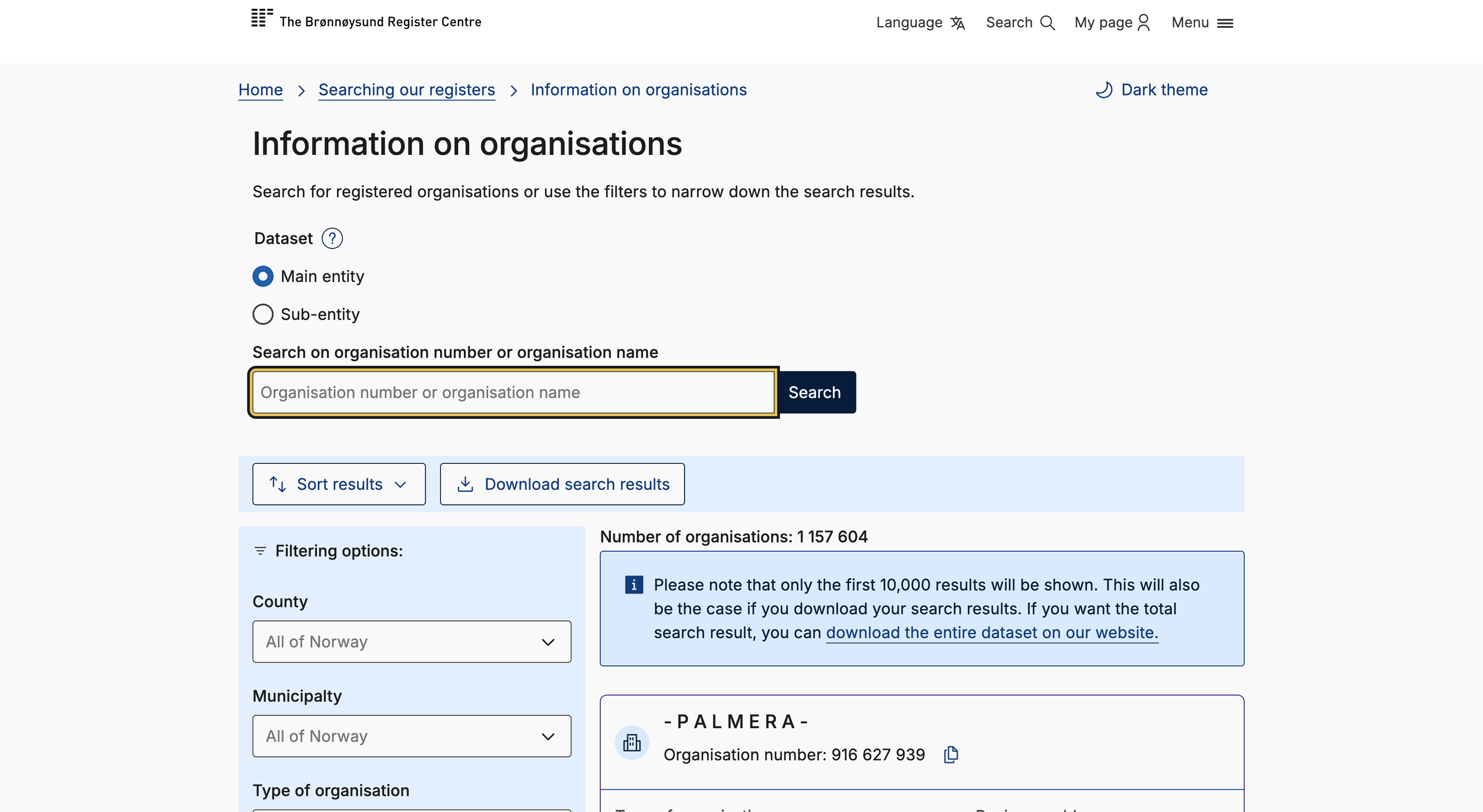
Searching for Norwegian companies
Step 1: Go to the Portal.
Go to the online portal. You will find it here: https://www.brreg.no/en/about-us-2/our-registers/about-the-register-of-business-enterprises/
Click ‘Company Search’ in the top-right-hand corner. This will take you to the main search function.
Step 2: Search for a Company.
Select language – either Norwegian or English.
Search by: Organisation name or number.
Search in: Main entity or sub entity.
Filter by: Country, municipality, organisation type or industrial code, date range, number of employees, bankruptcy or non-profit status.
For user experience: You can select either ‘Dark’ or ‘Light’ theme for the portal.
Step 3: View the Results.
The initial results will appear – the first 10,000 registered entities. This includes the following data points:
Name.
Number.
Business address.
Organisation type.
Select the entity you want to investigate further.
Step 4: Investigate Entity.
The entity profile has the following data points (depending on the entity type):
Basic: Name, organisation number, business address, number of employees, and registration date (called ‘date of foundation).
Legal: Industrial code, organisation type, activity, and sectoral classification,
Officers: Managers, chairs, board members, signature rights, and properties.
Contact: Address, email, mobile number and website.
Ownership: Affiliated organisations, sub-entities, and roles in other organisations.
You can click ‘Download all information’ as a PDF company extract.
Step 5: Download Documents.
When the Kyckr team accessed the Register of Business Enterprises on April 10, 2026, only Annual Accounts (Norwegian) were available as a one-click download on the entity’s profile.
Most official company documents are available on the ‘Webshop’, accessible from each entity profile.
Historic changes to business addresses, capital, articles of association, and initial registration can be found under ‘Announcements’.
Available Documents
Official company filings can be ordered from the ‘Webshop’.
Annual Accounts (free).
Role overview organisation number (free)
Regular company certificate (free, or NOK 181 if posted).
Notarised company certificate (NOK 424).
Notarised company certificate in English (NOK 424) – doesn’t contain the purpose stated in the Articles of Association.
Company certificate with historical company name (free, or NOK 181 if posted)
Register printout from the Unit Register (free).
Confirmation from the Bankruptcy Register (free).
Articles of Association (NOK 241).
Foundation documents (NOK 241).
How to order: Add the items to the cart, register for an account (include name, email, password, and nationality), and enter your email. You should receive them instantly.
APIs and Open Data
The Register of Business Enterprises is an API-first business registry, offering API access and bulk datasets, including basic company data, beneficial ownership data, and reporting obligations.
Access: Open access, except for beneficial ownership data, which requires users to prove a legitimate interest.
Norway’s Beneficial Ownership Register
Norway’s beneficial ownership register went live in October 2024 after a decade of delays, the result of legal uncertainty arising from the CJEU court ruling in 2022.
Form: Norway’s UBO register is solely API-based, offering no portal search function. According to the Brønnøysund Register Centre, this is to make it easier for the register to approve and authenticate users.
Access: Aligned with the 6AMLD, the Brønnøysund Register Centre only provides access to competent authorities, Norwegian obliged entities, and those with a legitimate interest, including journalists, civil society, investigators, and third-country obliged entities.
Other ways to access UBO data in Norway: Norway made UBO data searchable via the EU's Beneficial Ownership Registers Interconnection System (BORIS).
How to Access Norway’s UBO Register
If you’re a third-country obliged entity, you don’t get automatic access to Norway’s UBO register. You must prove you have a legitimate interest. Here’s how:
Step 1: Register and configure access
Register in Samarbeidsportalen to receive a Client ID, Key ID, and private key. Configure the access scope based on legitimate interest.
Step 2: Authenticate and connect
Authenticate using the registered credentials through Maskinporten, which grants secure access to public APIs. Each session produces a short-lived access token to limit repeat queries and control extraction volumes. Manage the token through a Python notebook to keep authentication secure. Queries to the BO register's API require a company number and return data in JSON format.
Step 3: Test usability
Source company identifiers from the Enhetsregisteret – Norway's register of legal entities – which offers a public bulk download of all active and dissolved companies. Use these identifiers to assess the usability, completeness, and structure of the BO register data.
Alternatively, use Kyckr for instant, live access to Norwegian UBO data.
How to Access Norwegian Shareholder Information
Private limited companies are legally obligated to keep shareholder registers, but the information isn’t made available on the Register of Business Enterprises; it can only be requested from the companies.
According to the Skatteetaten, "All Norwegian private and public limited liability companies and savings banks with equity certificates must submit an annual shareholder register statement. The statement is submitted to the Norwegian Tax Administration's Register of Shareholders."
Shareholder registers are available as PDFs on the ‘Printouts and certificates’ page.
The following data points are available in Norwegian:
Company name and number
Shareholder names, year of birth, and addresses.
Share class, number of shares, and total number of company shares.
Freshness: Shareholder information is updated up to December 31 of each tax year.
Bear in mind, Norway’s registry system doesn’t provide structured shareholder data, only PDFs that must be manually parsed.
Is Norway’s Company Registry Data Reliable?
Norway’s Register of Business Enterprises uses automated tools to verify the information that companies submit about themselves.
Verification at Registration: According to Business Register Insights’ 2024 survey, Norway’s Register of Business Enterprises uses automated tools to cross-reference entity data at registration. This includes the taxpayers’ register, sanctions and disqualified entities lists, and public addresses.
Active Enforcement: The Register of Business Enterprises uses an automated process that triggers court-referred compulsory dissolution when an entity is noncompliant with filing obligations.
Lack of Unique Identifiers: While digital-first, the Register of Business Enterprises doesn’t give natural persons unique identifiers, which makes locating specific individuals harder. However, every registered individual linked to a legal entity must provide an ID number, though this isn’t public information.
In short, Norway’s business register is a ‘gatekeeper’, not simply a ‘librarian’.
Norway’s Data Is Excellent, If You Can Access It
Performing enhanced due diligence on Norwegian companies as a third-country obliged entity requires navigating three separate systems.
You must access the business registry. Source manual shareholder registers from the Skatteetaten. And prove your legitimate interest in accessing UBO data.
Three separate systems, for one country.
Kyckr puts them all in one place.
Kyckr consolidates company and UBO data from Norway, making it structured and searchable, alongside live company data from 299 other official company registries globally.